Selasa, 26 April 2011

Fakta Menarik Tentang "Password"


Kita sering memikirkan apakah kombinasi kata laluan (password) yang paling selamat untuk digunakan. Di sini MCREW senaraikan fakta menarik yang mungkin boleh membantu anda dalam membuat kata laluan paling selamat untuk akaun penting seperti 'online banking', Facebook, Twitter dan Yahoo Email.


Adakah anda tahu?


*Kata laluan 6 digit dengan kombinasi 'lower case' (tulisan kecil) perlukan 10 minit untuk digodam.
*Kata laluan
 6 digit dengan kombinasi 'upper case' (tulisan besar) perlukan 10 jam untuk digodam.
*Kata laluan
 6 digit dengan kombinasi nombor atau simbol perlukan 18 hari untuk digodam.
*Kata laluan
 9 digit dengan kombinasi nombor dan simbol perlukan 44,530 tahun untuk digodam.

Jadi yang mana paling selamat? Hanya Anda Yang Tahu .

(Berdasarkan laporan statistik yang dikumpul dari Blommberg Businessweek)

Isnin, 25 April 2011

Game Booster Premium v2.3 x86-x64 Silent Installs


Game Booster Premium v2.3 x86-x64 Silent Installs


Designed to help optimize your PC for smoother, more responsive game play in the latest PC games with the touch of a button, Game Booster helps achieve the performance edge previously only available to highly technical enthusiasts.

It works by defragmenting game directories, temporarily shutting down background processes, cleaning RAM, and intensifying processor performance. That means you can keep all the features of operating systems ready for when you need them, but turn them off when you are ready to get down to serious business � gaming.

Works compatible with PunkBuster, Cheating-Death, VAC, and any other anti-cheat software, Game Booster makes it simpler to enjoy the latest games and take your experience to a new level. All systems go!

Key Benefits:
- 1 Click. Game Booster is extremely easy to use. Its intuitive interface makes Game Booster the perfect tool for complete computer beginner.
- Speeds up Game Play. Game Booster gives more CPU and RAM to your games, making your games running at the peak performance.
- Defragments Game Files. Game Booster can quickly defragment game directories and files, to make your games load and run faster than ever.
- Increases Gaming Stability. Game Booster prevents and avoids possible conflicts and incompatibility, by temporarily closing background processes and unnecessary Windows services.
- Safe, Secure, and Free. Game Booster does not overclock your hardware, does not change your Windows Registry and system settings. Game Booster is 100% freeware, without any virus, adware, and spyware.

Operating System: Designed for Windows 2000, XP, Vista and Windows 7 (32-bit and 64-bit).

What's new in Game Booster 2.3:
- Improved interface
- Improved Game Driver module
- Fixed general bugs


.::.


Brought To By Storm Riders Silent Installs� Company.

Please remember to credit if you are going to post this software elsewhere.

All titles, content, publisher names, trademarks, artwork, and associated imagery are trademakes and or copyright material of their respective owners. All rights reserved.


Credit : Silent Hackers

How to Flush DNS in Microsoft Windows

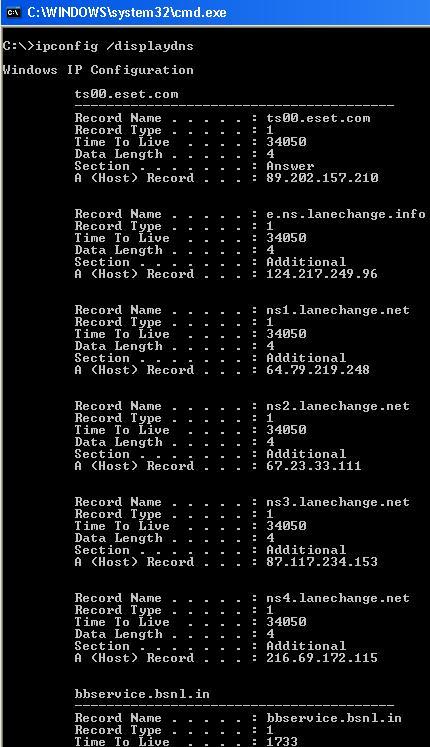
In Microsoft Windows, you can use the command ipconfig /flushdns to flush the DNS resolver cache. Open the command prompt and type the following:


C:>ipconfig /flushdns
Windows IP Configuration
Successfully flushed the DNS Resolver
 Cache.


 The above command will completely flush the DNS, deleting any incorrect entries too. You can also use the command ipconfig /displaydns to view the DNS resolver cache.


Turning Off DNS Caching under Microsoft Windows


If you experience frequent issues with DNS caching under Microsoft Windows, you can disable client-side DNS caching with either of these two commands:
net stop dnscache
sc servername stop dnscache
This will disable DNS caching until the next reboot. To make the change permanent, use the Service Controller tool or the Services tool to set the DNS Client service startup type to Disabled. You can permanently disable DNS Client by following the below steps:
  • Goto Start and click on Run.
  • Type Services.msc in the Run command box.
  • A window listing all the services will popup. Search for a service called DNS Client.
  • Double click on the listed DNS Client service and click Stop. Similarly, you can restart it by clicking Start.

Tuning DNS Caching under Microsoft Windows

You can modify the behavior of the Microsoft Windows DNS caching algorithm by setting two registry entries in the HKEY_LOCAL_MACHINESYSTEMCurrentControlSetServicesDnscacheParameters registry key.
The MaxCacheTtl represents the maximum time that the results of a DNS lookup will be cached. The default value is 86,400 seconds. If you set this value to 1, DNS entries will only be cashed for a single second.
MaxNegativeCacheTtl represents the maximim time that the results of a failed DNS lookup will be cached. The default value is 900 seconds. If you set this value to 0, failed DNS lookups will not be cached.

Flush DNS in Mac OSX

In Mac OSX Leopard, you can use the command dscacheutil -flushcache to flush the DNS resolver cache:
bash-2.05a$ dscacheutil -flushcache
In Mac OSX versions 10.5.1 and before, the command lookupd -flushcache performed the same task:
bash-2.05a$ lookupd -flushcache

Flush DNS in Linux

In Linux, the nscd daemon manages the DNS cache. To flush the DNS cache, restart the nscd daemon. To restart the nscd daemon, use the command `/etc/init.d/nscd restart`.

TeamViewer v6.0.10124 x86-x64 Silent Installs


TeamViewer v6.0.10124 x86-x64 Silent Installs

Desktop Sharing - Remote Control - Support. Simple - fast - secure. TeamViewer is a simple and fast solution for remote control, desktop sharing and file transfer that works behind any firewall and NAT proxy. To connect to another computer just run TeamViewer on both machines without the need of an installation procedure. With the first start automatic partner IDs are generated on both computers. Enter your partner's ID into TeamViewer and the connection is established immediately. With many thousand users worldwide TeamViewer is a standard tool to give support and assistance to people in remote locations. The software can also be used for presentations, where you can show your own desktop to a partner. TeamViewer also is VNC compatible and offers secure, encrypted data transfer with maximum security. TeamViewer establishes connections to any PC all around the world within just a few seconds. You can remote control your partner's PC as if you were sitting in right front of it.

TeamViewer is completely free for private use.

Features:
- One solution for everything. While most competitors offer different packages for remote support, remote administration, training and sales (and also charge for them...) TeamViewer is the one-stop solution for everything you need: TeamViewer includes all modules in one simple and very affordable package.
- Remote administration of unattended servers. TeamViewer can also be used to control unattended computers and servers. Installation as a system service even allows remote reboot and reconnect.
- File transfer. TeamViewer comes with integrated file transfer that allows you to copy files and folders from and to a remote partner - which also works behind firewalls
- Highest security standard. TeamViewer is a very secure solution. All versions feature completely secure data channels with key exchange and RC4 session encoding, the same security standard used by https/SSL.
- No installation required. To install TeamViewer no admin rights are required. Just run the software and off you go...
- High performance with international router network. Optimized for connections over LANs AND the Internet, TeamViewer features automatic bandwidth-based quality selection for optimized use on any connection.
TeamViewer uses an extended international server network with server locations in many countries all over the world, so no matter where you are located we will make sure that a high-security, high-performance router near your home destination will ensure great performance.
- Remote support without installation. With TeamViewer you can remotely control any PC anywhere on the Internet. No installation is required, just run the application on both sides and connect - even through tight firewalls.
- Remote presentation of products, solutions and services. The second TeamViewer mode allows you to present your desktop to a partner. Show your demos, products and presentations over the Internet within seconds - live from your screen.
- Works behind firewalls. The major difficulties in using remote control software are firewalls and blocked ports, as well as NAT routing for local IP addresses. If you use TeamViewer you don't have to worry about firewalls: TeamViewer will find a route to your partner.
- Flexible use for a variety of applications. TeamViewer lets you connect to your partners in many different ways: You can either view or control your partner's desktop in order to do online-support; You can transmit your screen to your partners for presentation purposes - You may even change directions during a session for high fidelity teamwork!

Changes in TeamViewer 6.0:
Improved: Custom QuickSupport
- When you create your individual Custom QuickSupport, enter your partner list data. As soon as your customer starts QuickSupport, it appears in your partner list, and you can reach it directly with a single click � without having to exchange an ID and password via telephone or e-mail.
- Position a personal disclaimer in QuickSupport to be legally on the safe side.
- Now, you can define the password security yourself.
- You also have the option of exchanging chat messages via QuickSupport and before establishing your TeamViewer connection, even if your customer does not have a partner list account.
All new: QuickJoin
- The new QuickJoin module is ideal for online presentations or meetings. With the invitation function, you can now send the session data to your participants ahead of the session. The participants now connect with you via the Windows application and not the other way around. This saves you from entering the data of every single one of your participants. As the presenter, you also determine the time at which the participants can see your application windows, even if they have already established a connection.
- With QuickJoin, all the important functions for online presentations, such as VoIP, video, whiteboard and chat, are available.
Individualized: The Host Module
- Adjust the TeamViewer Host Module completely on an individual basis according to your needs. Similar to the Custom QuickSupport, you can now also design the Host Module with your logo and your text. You can create both modules in the download area according to your needs.
Additional Improved and New Functions
- Optimized performance: TeamViewer connections are now even faster and more stable - particularly to and between company networks.
- More user-friendly design: Navigate even faster and more easily! The new clear division between the remote maintenance and presentation modes is more user-friendly and convincing with its refreshing design.
- Automatic: Now, TeamViewer re-establishes the connection automatically after a remote reboot or an update.
- New language version: TeamViewer is now also available in Chinese. Overall, TeamViewer is now available in 19 languages. Additional language versions will follow.
- More secure: You can protect the TeamViewer options with a password.


Brought To By Storm Riders Silent Installs� Company.

Please remember to credit if you are going to post this software elsewhere.

All titles, content, publisher names, trademarks, artwork, and associated imagery are trademakes and or copyright material of their respective owners. All rights reserved.

Credit : Silent Hackers

Silent Installs Guide For Noobs ( Standalone Installer )

Because there isnt an easy tutorial for people who doesnt know much about coding i made this really easy tutorial to make silent installs, please notice it wont work in all applications...Some applications need a bit more advanced users but at least it can help u to start learning and making your own silent installs for your modds in seconds...

1) - Download SFX Maker : SFX Maker 1.2.1 RC1 installer


2) - Install it and make sure you click on create a start menu shortcut while installing it otherwhise u wont find it...

3) - Run the program...I will use filezilla ftp for this tutorial :


4) - Click on the first [...] button as shown in the following pic and browse to the filezilla installer :


When you select it will appear in the first line as you can see showing you the path...

5) - Click on the second [...] button and it will search and type the code for you automatically :


6) - Click on the third [...] button and select where do you want to save to silent installer :


7) - Now in the final step you can choose if you want it to use the same icon than the original installer, the compression level, progress bar or nlite addon :


Usually compression level is ultra by default, you can click in use EXE Icon if you like...

8) - Click on create, and it will automatically create the silent installs for you :


That it !!! If you open the silent installs with winRAR or 7zip you will see the original installer inside :


- Note : Dont forget to test it first ! , the most common silent switches are :

/S/SILENT/VERYSILENT/q/quiet/? - This one will bring the silent switches avalaible if it has support for it

But this is supposed to be a guide for noobs so when you start not being a noob anymore reply the post for help, next time if you dont learn anything dont blame you, blame the teacher !

Please remember to credit if you are going to post this guide elsewhere...

Special thanks for nOak...


All titles, content, publisher names, trademarks, artwork, and associated imagery are trademakes and or copyright material of their respective owners. All rights reserved. 


CREDiT : SiLENT HACKERS

Ahad, 24 April 2011

Silent Installs Guide For Noobs 2 ( Directory )

If you want to make the firefox silent installer you will have to unzip the installer like you do with any other compressed file to a single folder and click on the directory tab of SFX Maker :


\
Click on the first [...] button like you did in the first tutorial and select the setup installer, usually you have to select the main installer and cause you have selected the directory tab it will save all of the other files too into the silent installer :


Now its everything the same as the main tutorial it only changes the directory instead of the single file :


Its the same method for mozilla thunderbird and you will find some applications have this method to.


Credit : SiLENT HACKERS